 bilipito
A kids GPS tracker app that runs on the phone your child already has
If your child already carries a smartphone, they already carry a GPS tracker: the phone has GPS, a data connection and a battery they charge every night anyway. Bilipito is a kids GPS tracker app that puts that phone to work. You install Bilipito on your phone, your child gets Bilipito Kids on theirs, and you pair the two with a QR code. From then on your child appears on your map — no watch, no bracelet, no second gadget.
What the kids GPS tracker app shows you
Where your child is right now
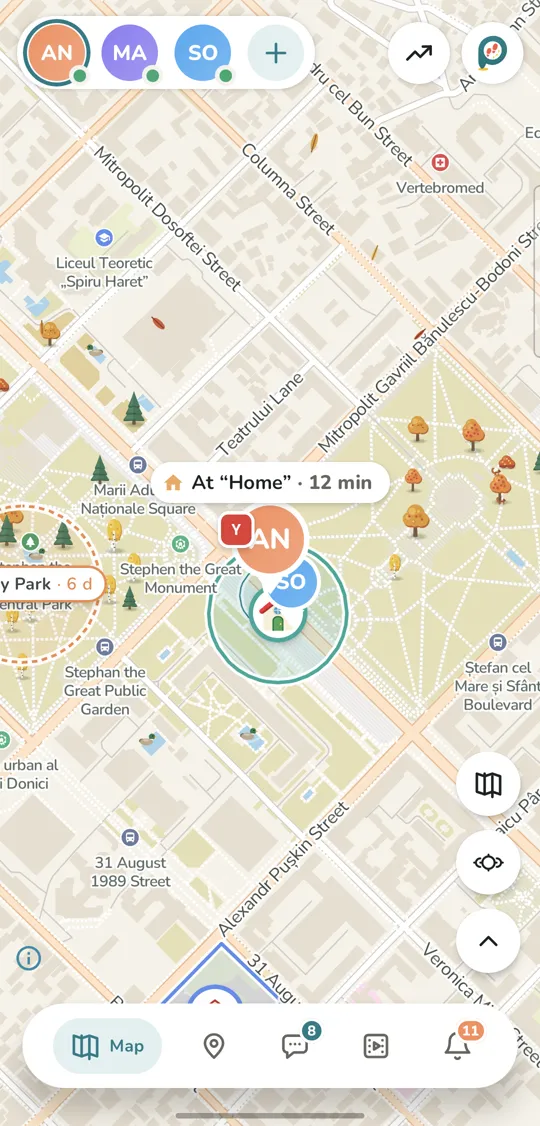
Open Bilipito, or the web dashboard at my.bilipito.com, and you see your child on the map with the phone’s battery level and the time of the last update. Tap “Find now” for a fresh location. To follow a trip as it happens, turn on live mode: the dot updates every 5 seconds while it’s on.
The day’s route
The day feed sorts your child’s day into places, walks and rides, with stops, addresses, steps and distance. “Replay the day” plays the whole route back on the map, step by step.
Home, school and other places
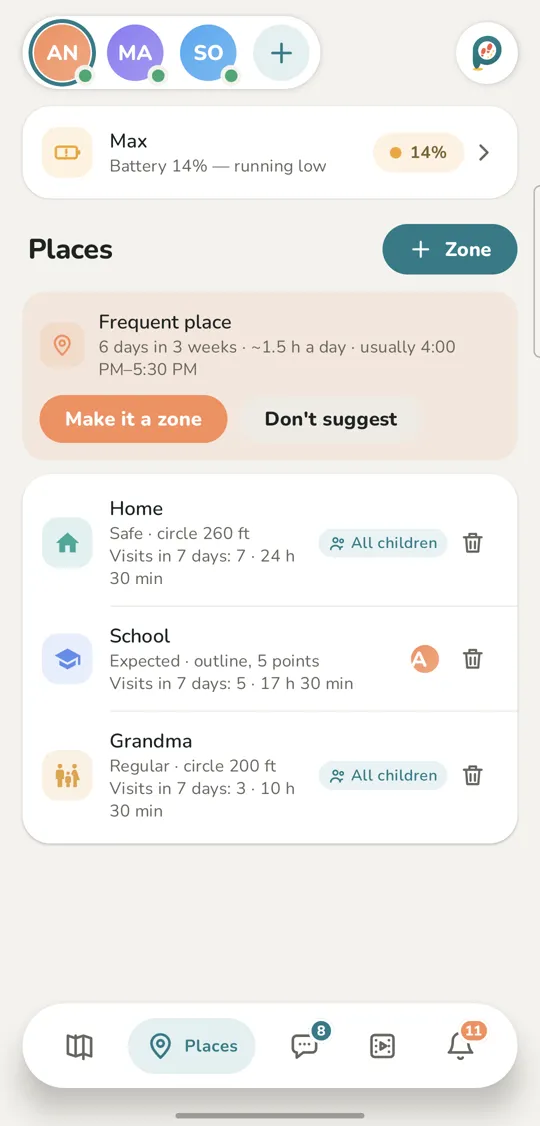
Draw a place on the map as a circle or an outline: home, school, a sports club. You get a notification when your child arrives and when they leave. Give a place a schedule and Bilipito tells you if your child “didn’t arrive by 8:00” or “left early”. A forbidden place triggers an alert at once.
SOS button and loud signal
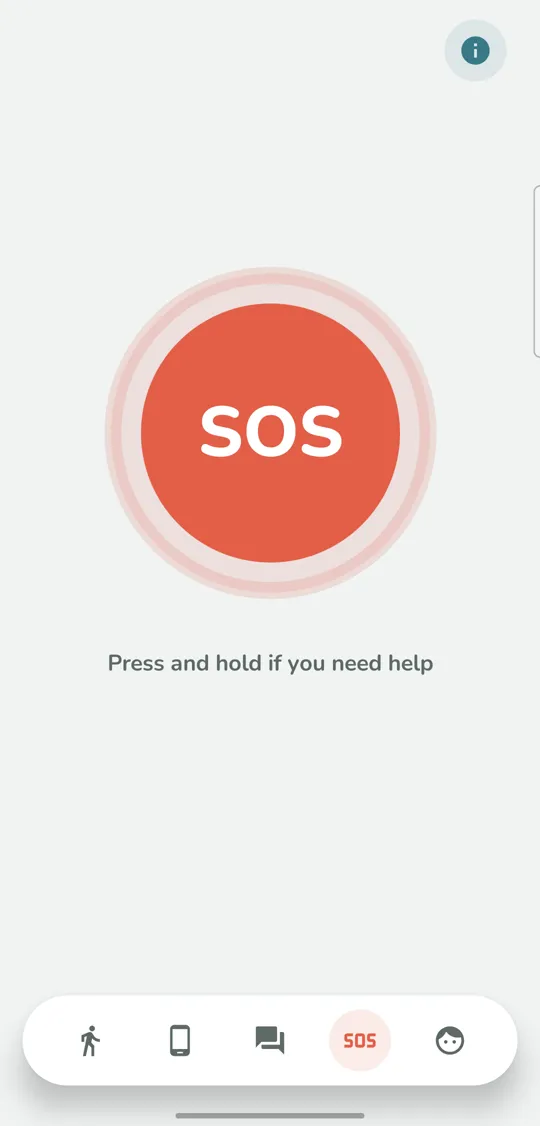
In Bilipito Kids, your child presses and holds the big SOS button. They have five seconds to cancel; then every parent gets an alert with the location — even at night, when other notifications wait until morning. If the phone is lost at home or buried in a backpack, turn on the loud signal: it makes the phone ring even in silent mode. (On a child’s iPhone, if Bilipito Kids is closed, the signal arrives as a notification sound, which silent mode mutes.)
Battery and phone status
Bilipito tells you if location is turned off, a permission is revoked, the phone goes offline, the battery runs low (10% and 5%) or Bilipito Kids is deleted. Without internet, the phone keeps its location points for up to 7 days and sends them as soon as it’s back online.
Phone or GPS watch? An honest comparison
A dedicated GPS watch or tag has one clear advantage: it works for a child who doesn’t have a phone yet. If your child is too young for a smartphone, a watch may be the better choice. Bilipito needs a child’s phone running Android 10 or newer, or an iPhone with iOS 17 or newer.
Once your child has a phone, a second device mostly adds chores: another thing to buy, charge and remember, and often its own SIM card. The phone is already the thing your child takes everywhere.
A phone-based tracker has limits too, and it’s fair to name them:
- It works while the phone is with your child, switched on and allowed to share location. Bilipito warns you if location is turned off or the phone goes offline.
- Outdoors, location is usually accurate to within a few metres; inside buildings and on the metro it’s less precise.
- Live mode uses noticeably more battery. The rest of the time, precise location turns on while your child is moving, and at rest the phone uses almost no charge.
- Bilipito is not an emergency service. In danger, call 112 or your local emergency number.
More than a dot on the map
Because Bilipito Kids runs on the phone itself, it also helps with how that phone gets used:
- App limits and screen time. Set a daily limit for an app or block it, and put school time and bedtime on a schedule, keeping the apps you choose allowed. Calls and SOS always work. On a child’s iPhone, limits run through Apple’s Screen Time.
- Phone while walking. If your child walks down the street staring at the screen for more than 30 seconds, the phone gently reminds them to look around. Calls, maps and music aren’t affected. It stays off until you turn it on, and it works on children’s Android phones.
- Family chat. Messages, photos and “I’m here” with a spot on the map — for your family only.
Open by design
Bilipito is only for families with children under 18, and it works openly. Before pairing, you and your child read the “What your family will see” screen together. Bilipito Kids never hides: the phone always shows when location is being shared. There are no ads and no selling of data. Places visited and routes are kept for 30 days, then deleted. The details are in our privacy policy.
Set up in about five minutes
- Install Bilipito on your phone and sign in with email or Google.
- Tap “Connect the child’s phone” to get a QR code.
- Install Bilipito Kids on your child’s phone, read the “What your family will see” screen together and scan the code.
- Grant the permissions Bilipito Kids asks for — it explains why it needs each one — and add home and school as places.
The Family plan covers 2 adults and 2 children. The first 7 days are free, then it’s $3.49 a month or $31.49 a year; the store shows the price in your currency, with taxes. Bilipito and Bilipito Kids are coming soon to Google Play and the App Store. Meanwhile, see every feature and how setup works, explore Bilipito as a family locator and for parental control, or see how it helps you find your child.
Screenshots are from the app; names and places in them are examples.