Bilipito and Bilipito Kids are coming soon to Google Play and the App Store. The web dashboard my.bilipito.com already works on iPhone, iPad and computers.
Olivia got to school
Amelia · 82%
Features
Where your child is, their day and SOS — on one screen
Real screens: your child on the map and parental control
This is how the app looks for a parent and for a child. Names and places in the screenshots are examples.
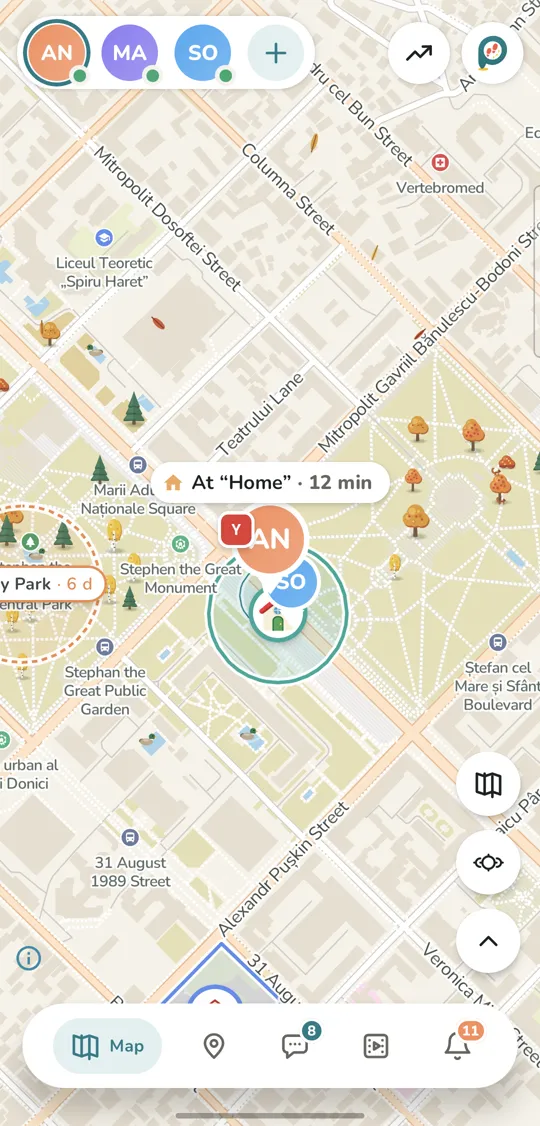
The whole family on one map
Your children on the living “Garden” map with trees, water and weather. See who is where, since when, and how much battery their phone has left.
Live mode: a new dot every 5 seconds
Family places: home, school, sports club, grandma’s
The same view in the app and in the web dashboard
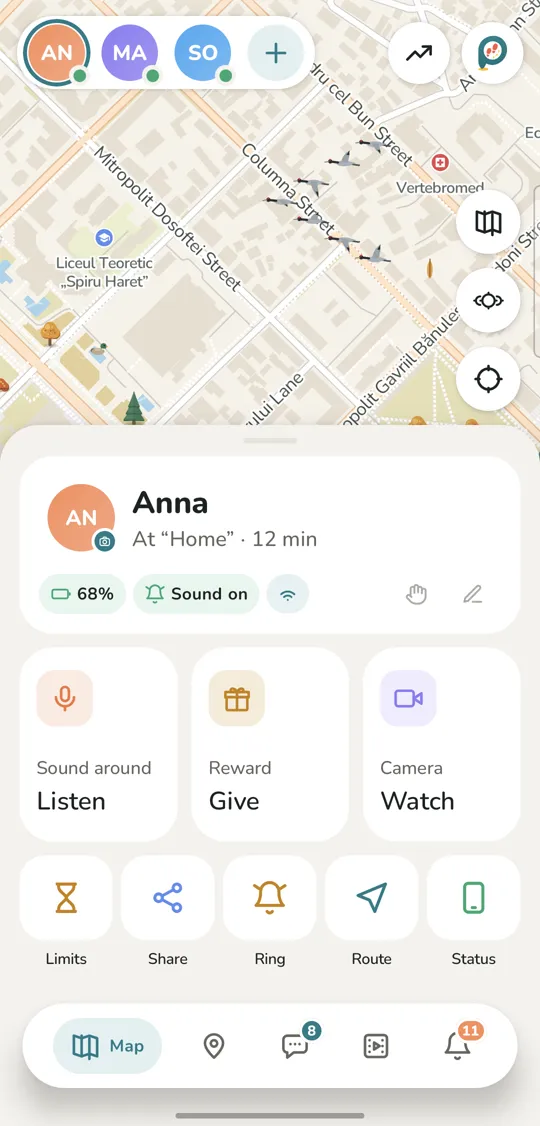
Your child’s card: everything at hand
Battery, ringer and connection at a glance. One tap to listen to what’s around, look through the camera, make the phone ring loudly, get directions or give a reward.
Sound and camera are live, never recorded, and your child sees a notificationAndroid only
A loud signal even in silent mode
Limits and phone status in one place
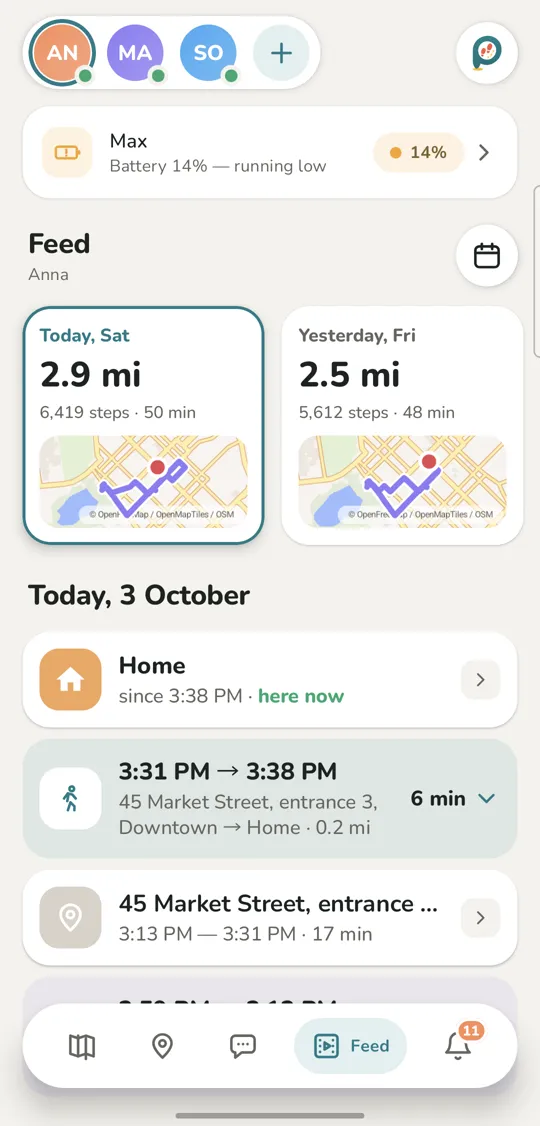
Your child’s day — without phone calls
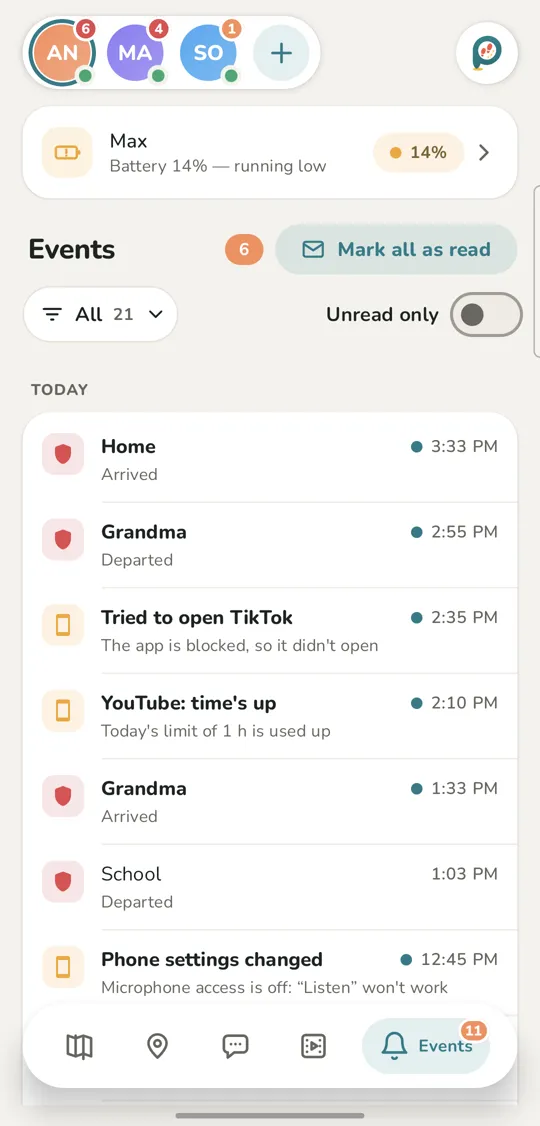
The day feed sorts the day into places, walks and rides by itself. What matters comes as a notification: arrived at school, left grandma’s, battery running low.
Steps, distance and time on the way
“Didn’t arrive by 8:00” and “left early”
At night only important events disturb you
Rules your child understands
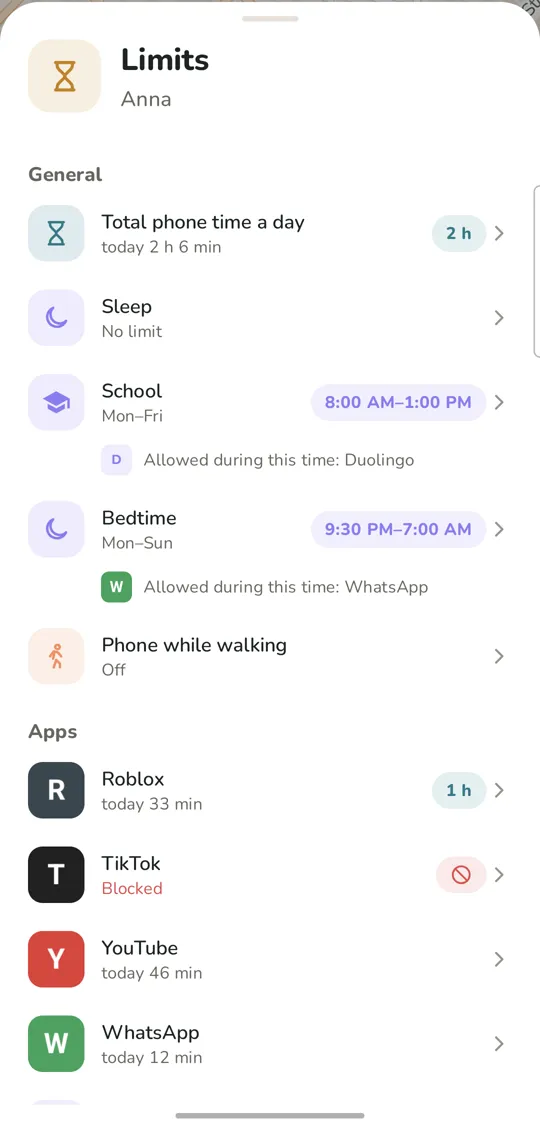
Daily phone time, limits for games and videos, school and bedtime on a schedule — with apps that are always allowed. Calls and SOS work at any time.
A limit or a block for any app
“Phone while walking”: a gentle reminder outdoorsAndroid only
Attempts to open a blocked app show up in the event feed
Bilipito Kids · for your child
An app your child actually likes
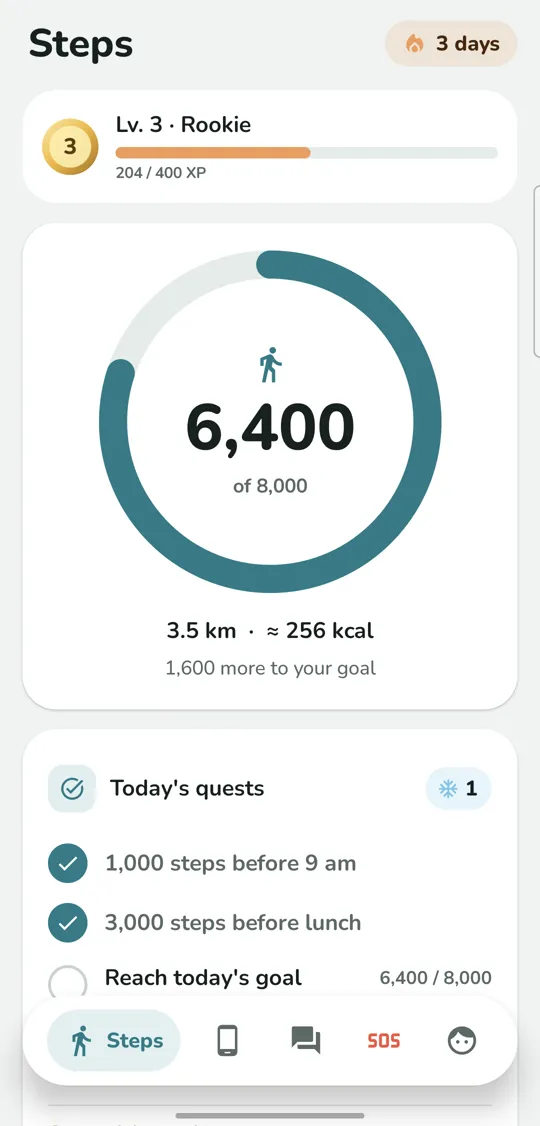
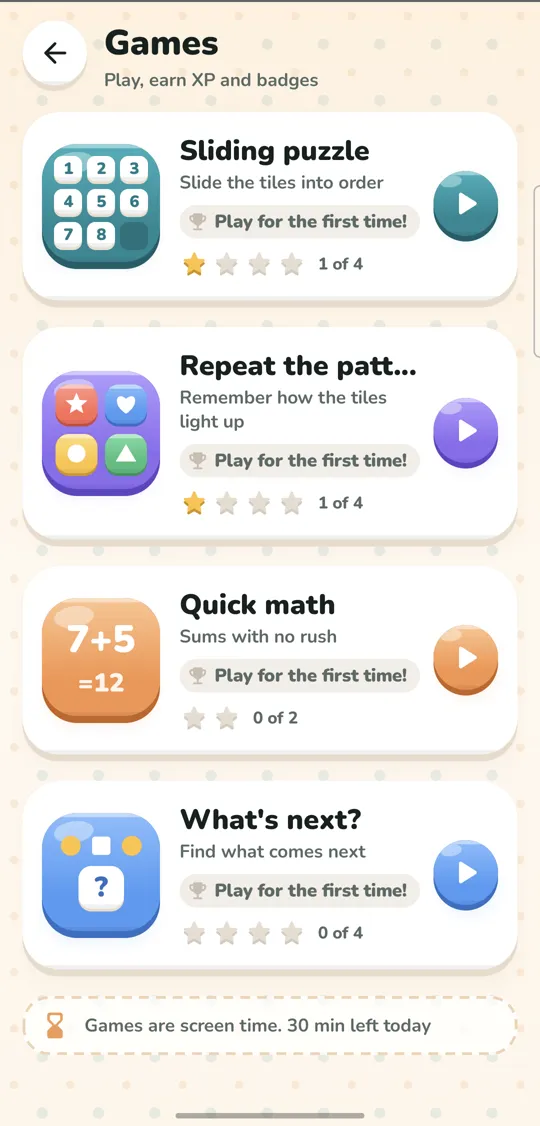
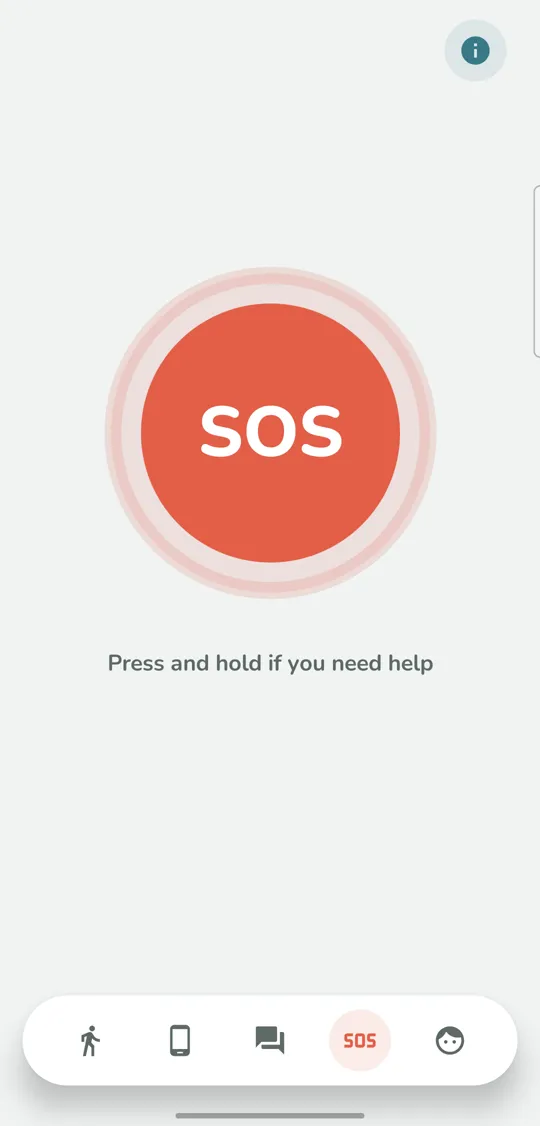
Steps and a daily goal, badges and levels, quests, brain games and the family chat. A big SOS button is always at hand — and games honestly count as screen time.
How to set up
Connect your child’s phone in five minutes
You’ll need your phone and your child’s phone. Keep your child close: the app first explains to them what the family will see.
Put Bilipito on your phone — Android or iPhone — and sign in with email or Google. The first 7 days are free, then $3.49 a month.
Add your child — a name and an avatar. The app shows a QR code and a connection code for their phone.
Install Bilipito Kids from Google Play — or, on an iPhone, from the App Store — and open it. Read the “What your family will see” screen together, agree — then scan the QR code or type the code in.
Bilipito Kids for your child
Point your child’s phone camera at the code to open the Bilipito Kids page.
Coming soon toGoogle PlayComing soon toApp Store
Bilipito Kids asks for everything it needs and explains why:
Location “Allow all the time” — so the location updates even when the app is closed.
Notifications — your child always sees that Bilipito is on, and gets the family’s messages.
Physical activity — for steps, badges and a more accurate route.
Usage access — to count screen time.
“App limits” in Accessibility — so your limits work.
Battery “Unrestricted” and autostart — so the phone doesn’t shut Bilipito Kids down.
On an iPhone — the same, the iPhone way: location “Always”, notifications, “Motion & Fitness”, Screen Time access for your limits, and Background App Refresh so the location updates in the background.
Your child appears on the map. Add places — home, school, a club — and invite the other parent or grandma.
1
Install Bilipito and sign in Your phoneSign in with email or Google
2
“Connect the child’s phone” Your phoneIt shows a QR code
3
Bilipito Kids on your child’s phone Child’s phoneScan the QR code
4
Grant the permissions Child’s phoneThe app walks you through it
5
DoneYour child is on the map 🎉
Grant the permissions
Location “Allow all the time” — so the location updates even when the app is closed.
Notifications — your child always sees that Bilipito is on, and gets the family’s messages.
Physical activity — for steps, badges and a more accurate route.
Usage access — to count screen time.
“App limits” in Accessibility — so your limits work.
Battery “Unrestricted” and autostart — so the phone doesn’t shut Bilipito Kids down.
Install Bilipito and sign in••••••••7 days free
“Connect the child’s phone”K7M2 X9
Done
Bilipito Kids on your child’s phoneBilipito Kids for your child
Point your child’s phone camera at the code to open the Bilipito Kids page.
Coming soon toGoogle PlayComing soon toApp Store
Pricing
One subscription for the whole family
Every feature included, no ads. One parent subscribes — and it works for everyone in the family.
The map, live mode and the day’s route
Places, SOS and the loud signal
Sound around, camera and app limits
Family chat, steps, badges and games
3,49 $a month
7 days free, then $3.49 a month
7 days free, then $31.49 a year
or $31.49 a year — a quarter less
Children
Adults
3,49 $
Each extra child+$0.49 a month
Each extra adult+$0.89 a month
Up to 8 children and 4 adults. The price in your currency, with taxes, is shown in the app store. Details are in the payment terms.
Honest with your child
No secrets from your child
Bilipito Kids works openly: your child knows you can see where they are. Details are in our privacy policy.
Your child always sees Bilipito. The app never hides, and their phone shows a notification that their parents can see where they are.
We explain first. Before connecting, your child sees the “What your family will see” screen, and a teenager confirms it themselves.
Sound and camera are never recorded. Live only and only when you ask, sessions of up to 10 minutes, and your child sees a notification.
The chat is deleted after delivery. A message is erased from the server as soon as everyone has it, and no later than 48 hours.
No ads, no selling data. Places and routes are kept for 30 days on our server in Moldova, then deleted.
For children only. Bilipito is for families with children under 18, not for keeping tabs on adults.
16:20
Bilipito Kids
Your parents can see where you areWhile you are on the move, your location is shared with your parents
One parent account works on one phone at a time (a tablet counts as a phone) plus two my.bilipito.com windows. Sign in on a new phone and the old one is signed out; you can switch back to it after 15 minutes. Got a new phone? Just sign in on it — everything moves over. A second adult should use their own account: the Family plan includes two adults, and you can add up to four.
What is Bilipito?
A family app in two parts: Bilipito for the parent and Bilipito Kids on the child’s phone. You see where your child is and how their day went, and get notifications about places and SOS. Your child gets steps, badges, games, the family chat and an SOS button. Everything works openly: your child knows their parents can see where they are.
What do I need to get started?
A child’s phone running Android 10 or newer, or an iPhone with iOS 17 or newer, and your phone with Bilipito — or any browser for the my.bilipito.com web dashboard. Connecting takes about five minutes; it’s best to have your child next to you.
Does it work with iPhone?
Yes. Bilipito for the parent (iPhone and iPad) and Bilipito Kids for the child (iPhone) are in final testing and coming soon to the App Store. Until then, parents with an iPhone can use the my.bilipito.com web dashboard on iPhone, iPad and computers: the map, chat, limits and rewards — just like in the app. On a child’s iPhone, limits work through Apple’s Screen Time, while Sound around and the camera aren’t available: iOS doesn’t let apps turn on the microphone and camera on request. A family can mix phones: a parent with an iPhone sees a child with Android, and the other way round.
How do I connect my child’s phone?
In Bilipito, tap “Connect the child’s phone” to get a QR code and a code. On your child’s phone, install Bilipito Kids (from Google Play, or from the App Store on an iPhone), read the “What your family will see” screen together, scan the code and grant the permissions the app asks for. Step by step — in “How to set up” above.
How do I sign in?
With email and a password, or with Google. It’s one account for the app and the web dashboard. If you forget your password, you’ll get an email with a 6-digit code to set a new one.
Can I use it from a computer?
Yes. The my.bilipito.com web dashboard works in any modern browser: the map, the day feed, places, chat, limits and rewards — just like in the phone app.
What languages is Bilipito available in?
The Bilipito and Bilipito Kids apps, the web dashboard, notifications and this site are available in 20 languages: Русский, English, Română, Українська, Polski, Deutsch, Français, Español, Italiano, Português, Türkçe, Tiếng Việt, Bahasa Indonesia, हिन्दी, বাংলা, العربية, اردو, 中文, 日本語, 한국어. You can change the language in the app’s settings and on the site.
Location and places
How often does my child’s location update?
Often and precisely while moving, less often at rest — that’s how the phone saves battery. When you need to follow the way, turn on live mode: the dot updates every 5 seconds while it’s on.
What does the day’s route show?
Where your child was and for how long: places, walks and rides, stops with addresses, steps and distance. You can replay the day on the map and compare the week with earlier ones.
What are places, and how do schedules work?
A place is a circle or an outline on the map: home, school, a club. Regular and safe places tell you “arrived” and “left”. An expected place follows a schedule: “didn’t arrive by 8:00”, “left early”. A forbidden place triggers an alert at once. Bilipito also suggests turning places your child visits often into places.
How accurate is the location?
Outdoors it’s usually within a few metres; inside buildings and the metro it’s less precise — it depends on GPS, Wi-Fi and the network. Bilipito takes each point’s accuracy into account so it doesn’t confuse “near” with “inside” a place.
Can I share a location with someone outside the family?
Yes, with a temporary link — from 15 minutes to 72 hours. It shows only the current point, with no history or battery level. You can revoke the link at any time.
Is there a kids GPS tracker app that works without a smartwatch?
Yes. Bilipito turns your child’s phone into a kids GPS tracker: location on the map, the day’s route, places with arrive and leave alerts, an SOS button and the phone’s battery level. No need to buy a separate smartwatch — the phone your child already has is enough.
How do I see where my child is and find my child’s phone?
Open Bilipito or my.bilipito.com: your child appears on the map with the phone’s battery level and the time of the last update. If the phone is offline, the map keeps the last known location. And if the phone is lost somewhere at home or in a backpack, turn on the loud signal — it rings even in silent mode.
Safety and SOS
How does the SOS button work?
Your child presses and holds SOS. There are five seconds to cancel, then every parent gets an alert with the location — even at night, when other notifications wait until morning. Only a parent can close the alert, and your child will see that everything is fine.
What is the loud signal?
Your child’s phone rings loudly, even in silent mode. It helps to find a lost phone or reach a child who can’t hear the call. On a child’s iPhone, when Bilipito Kids is closed, the signal arrives as a notification with sound, which an iPhone in silent mode doesn’t play.
Does Bilipito replace emergency services?
No. Bilipito helps a family stay in touch, but in danger call 112 or your local emergency number.
Will I know if my child turns off location or deletes the app?
Yes. Bilipito tells you if location is turned off, a permission is revoked, the phone goes offline, the battery runs low (10% and 5%) or Bilipito Kids is deleted.
What if my child has no internet?
The phone keeps the points and sends them as soon as it’s back online — for up to 7 days. The map shows when the location was last updated.
Sound and cameraAndroid only
What is “Sound around”?
When you ask, you can listen live to what’s happening around your child — for example, if they haven’t answered calls for a long time. Sound around and the camera work when your child has an Android phone: on a child’s iPhone, iOS doesn’t let apps turn on the microphone and camera on request. A parent can listen and look from their own iPhone too.
And the camera?
In the same way, you can take a live look through your child’s phone camera. It’s for worrying moments, not for constant watching.
Does my child know they’re being heard or seen?
Yes. Their phone shows a notification — “A parent is listening to the sound around” or “A parent is looking through the camera” — and the system microphone or camera indicator.
Is sound or video recorded?
No, never: not on the server and not on the phones. The connection is direct and encrypted. We keep only the fact of a session — who and when — for 90 days.
How long does a session last, and who can start one?
Up to 10 minutes, then it ends by itself; you can start a new one. The family owner decides which adults are allowed sound and camera.
App limits
What can I limit?
Total phone time per day, time in individual apps and games, and any app can be blocked. You see how long your child spent in each app today and this week. On a child’s iPhone, Apple shows this report itself — on that iPhone and on a parent’s iPhone in Family Sharing; limits and blocking work the same way.
Can I set phone-free time?
Yes: school and bedtime by day of the week, for example lessons from 8:00 to 13:00 and sleep from 21:30 to 7:00. For each schedule you can keep apps that are always allowed — say, a dictionary during lessons.
What is “Phone while walking”?Android only
If your child walks down the street looking at the screen for more than 30 seconds, the phone gently reminds them to look around. Calls, maps and music aren’t affected. It stays off until you turn it on, and you’re told only about cases longer than 2 minutes. It works on children’s Android phones.
Will calls work when time is up?
Yes. Calls and SOS always work — whatever the limits and schedules.
Why does it need the “App limits” Accessibility permission?
So your limits and schedules apply on time. This service only knows which app is open right now: it doesn’t read the text on the screen or what your child types. There’s no such permission on an iPhone: there Bilipito Kids asks for Screen Time access, and iOS itself applies the limits.
Family and chat
How many children and adults can I connect?
The “Family” subscription includes 2 adults and 2 children. You can add up to 8 children and up to 4 adults: the other parent, a grandparent, a nanny.
How do I invite the other parent or grandma?
With a link or a QR code from the app — an invitation is valid for 7 days. The family owner decides what each adult can see: history, places, sound and camera.
How does the family chat work?
One shared chat for the whole family: messages, emoji, photos and “I’m here” with a spot on the map. It’s part of the subscription, and any parent can turn the chat off for a child.
Where are messages stored?
On the server — only until everyone has received them, and for no more than 48 hours. The history stays on the phones. On a new phone the chat starts from a clean slate.
What’s in Bilipito Kids for the child?
Steps and a daily goal, badges, levels and quests, games (“Sliding puzzle”, “Repeat the pattern”, “Quick math”), rewards from parents and 60 avatars. Games count as screen time and follow your schedules.
Who is family location sharing for?
For families with children under 18. All parents and trusted adults share one “Family” subscription: 2 adults and 2 children, and if needed up to 4 adults and 8 children. Each adult uses their own app or my.bilipito.com, and the family owner decides what each of them can see.
Subscription and payment
How much does it cost?
The first 7 days are free. The “Family” subscription (2 adults and 2 children) is $3.49 a month or $31.49 a year. Each extra child is +$0.49 a month, each extra adult +$0.89 a month. Every feature is included. The app store shows the price in your currency, with taxes.
Is there a trial?
Yes, 7 days free for new families. The trial is taken out in Google Play or the App Store and works only with a card (or another store payment method) added. We’ll send a reminder the day before it ends. If you don’t cancel the subscription before the end of day 7, the store charges automatically: $3.49 a month or $31.49 a year — the same in Google Play and the App Store. Cancel before the trial ends (in the App Store, at least 24 hours before it ends) and nothing is charged. The trial is given once: signing up again, a different email or the same child’s phone won’t bring it back.
Why does the trial need a card?
That’s how Google Play and the App Store set up free trials. Only the store sees the card details; Bilipito never receives them. Money is charged only when the 7 days are over, and only if you haven’t cancelled the subscription.
How do I subscribe?
The family owner subscribes in the Bilipito app: on Android through Google Play, on iPhone and iPad through the App Store. The subscription covers the whole family on any phone and in the web dashboard. Only the app store gets your card details.
How do I cancel?
In Google Play: profile → “Payments & subscriptions” → “Subscriptions” → Bilipito → “Cancel subscription”. On an iPhone or iPad: Settings → your name → Subscriptions → Bilipito → Cancel Subscription (or at apps.apple.com/account/subscriptions). Cancel in the store where you subscribed. It keeps working until the end of the paid period. Deleting the app or the account does not cancel the subscription. You can also cancel during the free trial, and then nothing is charged (in the App Store, at least 24 hours before it ends).
What happens when the subscription ends?
Bilipito stops working, SOS included, and your child’s phone stops sending data. What has already been collected is kept for the usual periods and comes back if you renew.
Can I get a refund?
Refunds follow the app store’s rules. Google Play: soon after purchase — right in Google Play; later — write to [email protected]. App Store: Apple decides on refunds; you can request one at reportaproblem.apple.com. Details are in the payment terms.
Privacy and data
Where is the data stored?
On our own server in Moldova (AIRSTREAM SRL), with backups in the same place. Google provides sign-in and notification delivery (on an iPhone, Apple delivers notifications); notifications contain no addresses or coordinates.
How long is everything kept?
Places and routes — 30 days; events, SOS and screen time — 90 days; steps — 60 days; chat messages on the server — until delivered, no more than 48 hours. Then everything is deleted, backups included. Your account and places are kept while you use Bilipito.
What doesn’t Bilipito collect?
Contacts, SMS, call logs, browser history, conversations in other apps, the photo gallery, typed text and screen content. We don’t show ads and don’t sell data.
Can it be used to keep tabs on an adult?
No. Bilipito is only for children under 18. Bilipito Kids never hides: the child sees the app and a notification that their parents can see where they are.
How do I delete my account?
In the app: “Settings” → “Account” → “Delete account”, or in the web dashboard. The account and data are deleted right away, and the children’s phones stop sharing location. Details are on the account deletion page.
Can I track my child’s location with their consent?
Yes — that is how Bilipito works: it is open parental control. During setup you and your child read the “What your family will see” screen together, and only then are the permissions granted. While the phone shares its location, it shows a notification about it, and in Bilipito Kids your child sees what their parents can see.
Problems with the child’s phone
The location updates rarely or late
Most often the phone is saving battery and putting Bilipito Kids to sleep. Set its battery to “Unrestricted”, turn on autostart and don’t swipe the app away from recent apps. On an iPhone, check that Bilipito Kids has location “Always” and Background App Refresh on (Settings → General), and that Low Power Mode is off; don’t swipe the app away there either. Bilipito tells you exactly what to fix: the child’s card has a phone check.
How do I set up a Samsung?
“Settings” → “Apps” → Bilipito Kids → “Battery” → “Unrestricted”. Remove Bilipito Kids from “Sleeping apps”. If the “App limits” switch in Accessibility is greyed out, open Bilipito Kids in Settings, tap ⋮ → “Allow restricted settings”.
How do I set up a Xiaomi, Redmi or POCO?
Turn on “Autostart” for Bilipito Kids, choose “No restrictions” in “Battery saver”, and lock it in recent apps. On Huawei, Honor and Oppo the settings have similar names: autostart and background activity.
Location is turned off on my child’s phone
Turn it on in the quick settings and check that Bilipito Kids has the location permission “Allow all the time” and precise location. On an iPhone: Settings → Privacy & Security → Location Services — turn them on and set Bilipito Kids to “Always” with Precise Location on. Bilipito will tell you if location is turned off again.
Does it drain the battery?
No: precise location turns on while moving, and at rest the phone uses almost no charge. Live mode uses noticeably more — turn it on when you really need it.
My child deleted Bilipito Kids or got a new phone
You’ll get a notification. Install Bilipito Kids again (from Google Play or the App Store) and connect the phone with a code from the app — your child’s history is kept.
Calmer from day one
Connect your child’s phone in five minutes — and see their day just like on this map.
 bilipito